Register the EQON application in Entra
To allow users to sign in to EQON with their existing organizational ID, you first need to register the EQON application and permit it to access user profiles in your Entra tenant. You then register the applications you want to allow users to access.
As an Entra administrator, you can consent for your entire organization to use EQON. Users can sign in to EQON with their organizational identity without having to consent themselves.
Install EQON enterprise application in Entra
To perform the steps below, you need to be an Entra administrator.
Permit EQON to access user profiles in Entra
-
In your browser, make sure that you've signed in to Azure AD as the tenant administrator, and then navigate to:
https://login.microsoftonline.com/YOUR_ENTRA_TENANT_ID/adminconsent?client_id=f7aa4ea7-9deb-48e6-971d-09336e6229a0Where
YOUR_ENTRA_TENANT_IDis the ID of your Entra tenant. To find your tenant ID, see this article. -
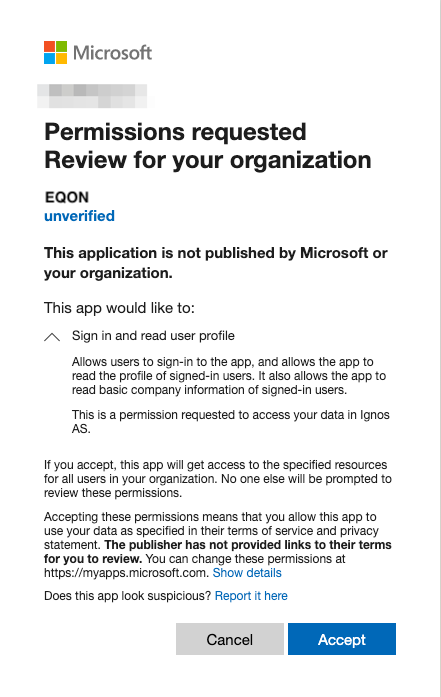
If prompted, confirm the account you want to use to consent to the request.
-
Review and accept the permission request information, and select Accept.
For more information, see Consent experience for applications in Microsoft Entra ID.
 NOTE
NOTEYou can safely ignore any HTTP 400 errors you receive.
You have now permitted EQON to access user profiles in your Azure AD, and can register applications you wish to authorize to access the API.